
Your mouse sensitivity is one of the most important settings in Counter-Strike 2. It directly affects your aim, consistency, and overall comfort. There is no universal “best” sensitivity, however—the ideal setup depends on your hardware, desk space, and playstyle. This guide explains everything you need to know to find the right sensitivity for you.
Why Mouse Sensitivity Matters in CS2
In Counter-Strike 2, every mouse movement translates directly into your aim. A poorly chosen sensitivity can reduce precision, lead to overcorrections, or make it harder to react quickly.
A well-balanced sensitivity should allow you to:
- Make precise micro-adjustments
- Hit fast but controlled flick shots
- Perform smooth 180° turns
- Maintain consistent spray control
- Keep your aim stable under pressure
While the right sensitivity won’t instantly make you a better player, it provides the foundation for long-term improvement.
DPI, Sensitivity, and eDPI Explained
What’s the Difference Between DPI and In-Game Sensitivity?
DPI (Dots Per Inch) is a hardware setting that determines how sensitive your mouse sensor is.
CS2 sensitivity is the software multiplier applied inside the game.
Together, these two values determine your actual aiming speed.
What Is eDPI?
eDPI (effective DPI) is calculated by multiplying your mouse DPI by your in-game sensitivity.
Formula:
eDPI = DPI × In-Game Sensitivity
Examples:
- 400 DPI × 2.00 = 800 eDPI
- 800 DPI × 1.00 = 800 eDPI
Although the settings differ, both produce exactly the same turning speed.
eDPI has become the standard way to compare sensitivity between players.
Why eDPI Matters
Using eDPI makes it easier to:
- Compare your settings with professional players
- Switch mice without changing your overall sensitivity
- Restore your preferred setup quickly
- Analyze your settings more accurately
How to Find Your Ideal Sensitivity
A simple process that works well:
- Choose your DPI (400 or 800 is recommended)
- Start with an eDPI between 700 and 900
- Test it in Deathmatch or Aim maps
- Make small adjustments (±0.05 or ±0.10)
- Stick with each setting for several days
The goal is to find the best balance between comfort and accuracy.
How to Change Your Sensitivity in CS2
There are two methods.
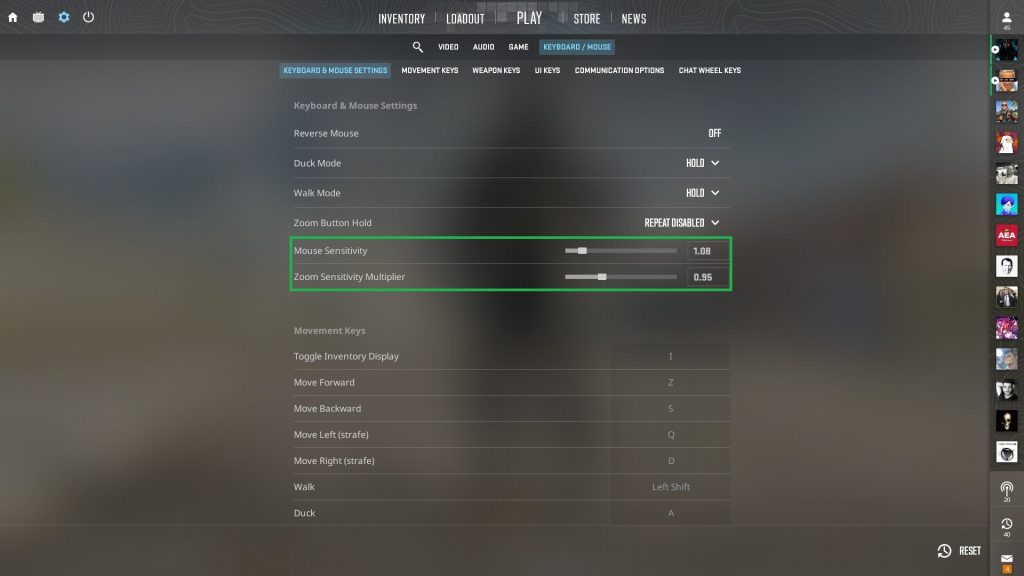
Through the Settings Menu
- Open Settings
- Select Keyboard & Mouse
- Adjust your mouse sensitivity
Using the Developer Console
Enter:
sensitivity XReplace X with your desired sensitivity value.
What Is the Best CS2 Sensitivity?
There isn’t a single perfect sensitivity.
However, professional player data reveals some clear trends.
Most CS2 pros use:
- 400 or 800 DPI
- 600–1,200 eDPI
- A medium sensitivity rather than extreme low or high values
This range offers an excellent balance between precision and speed.
CS2 Pro Sensitivity Settings
Here are a few examples of professional players:
| Player | DPI | Sensitivity | eDPI |
|---|---|---|---|
| ZywOo | 400 | 2.00 | 800 |
| NiKo | 800 | 0.69 | 552 |
| ropz | 400 | 1.77 | 708 |
| donk | 800 | 1.25 | 1,000 |
| s1mple | 400 | 3.09 | 1,236 |
| XANTARES | 400 | 2.30 | 920 |
| device | 800 | 1.25 | 1,000 |
The data shows:
- Most pros fall between 700 and 1,000 eDPI
- Very few exceed 1,300 eDPI
- A handful of players succeed with unusually high or low sensitivities
Low vs. High Sensitivity
Low Sensitivity
Advantages
- Higher precision
- More consistent micro-adjustments
- Better spray control
Drawbacks
- Requires more desk space
- Larger arm movements
- Slower turns
High Sensitivity
Advantages
- Faster turns
- Easier flick shots
- Better suited to small mousepads
Drawbacks
- Lower precision
- Harder recoil control
- Requires greater consistency
| Low Sensitivity | High Sensitivity |
|---|---|
| Maximum precision | Maximum speed |
| Better control | Faster reactions |
| Large mousepad recommended | Works well in limited space |
| Primarily arm aiming | Primarily wrist aiming |
Best Sensitivity for Small Mousepads
If you have limited desk space:
- Choose a medium-to-high sensitivity
- Make sure you can comfortably perform a full 180° turn
- Avoid extremely low sensitivities
A small mousepad naturally limits your range of motion.
Best Sensitivity for AWP Players
Many AWPers use slightly higher sensitivities than riflers because they frequently rely on:
- Fast flick shots
- Quick target acquisition
- Frequent repositioning
That said, several elite AWP players still prefer medium sensitivities for added consistency.
Ultimately, there is no universal rule.
Converting VALORANT Sensitivity to CS2
If you’re switching from VALORANT, you can approximate your CS2 sensitivity using this formula:
CS2 Sensitivity ≈ VALORANT Sensitivity × 3.18
Example:
- VALORANT: 0.30
- CS2: 0.95
Keep in mind that the games use different engines and mechanics, so the overall feel may still vary slightly.
Why Polling Rate Matters
Polling rate determines how often your mouse reports its position to your PC.
Typical values include:
- 125–250 Hz: Basic
- 1,000 Hz: Standard for gaming
- 2,000 Hz and above: High-end gaming mice
Higher polling rates improve responsiveness and produce smoother cursor movement, especially on high-refresh-rate monitors.
Should You Copy Pro Players’ Settings?
Professional settings are excellent reference points, but they shouldn’t be copied blindly.
Your ideal sensitivity depends on:
- Your playstyle
- Your mouse
- Your monitor
- Your desk space
- Your personal comfort
Use pro settings as inspiration, then adjust them to fit your own preferences.
Should You Change Your Sensitivity Frequently?
Generally, no.
Constantly changing your sensitivity prevents your brain from developing reliable muscle memory.
Instead:
- Experiment gradually
- Make only small adjustments
- Commit to one setting for several days before changing it again
Consistency almost always leads to better long-term improvement.
Finding Your Perfect CS2 Sensitivity
Finding the best sensitivity in Counter-Strike 2 is a personal process. There is no magic number—only the setting that feels right for your hardware, playstyle, and comfort.
Once you’ve found a solid baseline, resist the temptation to constantly tweak it. Over time, consistency, muscle memory, and practice will have a much greater impact on your aim than endlessly chasing the “perfect” sensitivity.